
Archive and Restore for Workflows
Learn how to recover deleted workflows from Trash in V7 Go. Restore workflows within 30 days or permanently delete them to free up space.
Trash and Restore for Workflows
When you delete a workflow, it moves to Trash instead of being permanently removed. You have 30 days to restore it before it's gone for good.
What is Trash?
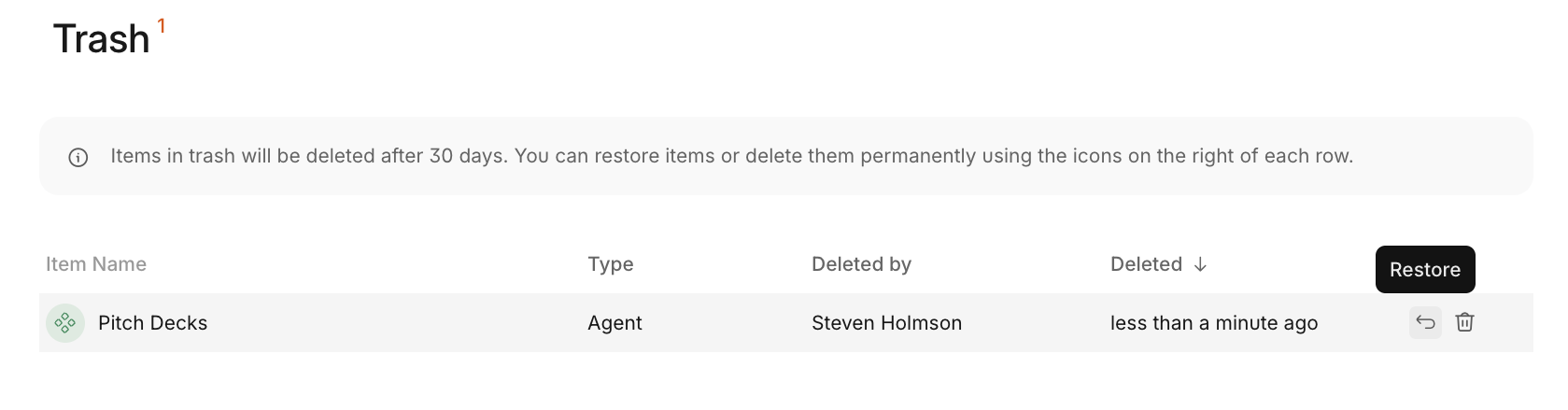
Trash is a dedicated section in your workspace that holds all deleted workflows. Each deleted workflow stays in Trash for 30 days, giving you time to recover it if needed.
The Trash page displays:
- All deleted workflows in your workspace
- Who deleted each workflow
- When each workflow was deleted
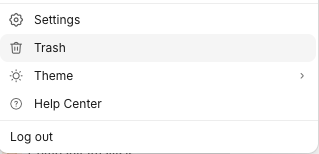
How to access Trash
-
Click your workspace icon in the top-left corner
-
Select Trash from the menu
Restore a deleted workflow
-
Go to Trash
-
Find the workflow you want to restore
-
Click Restore
-
Choose the folder where you want to restore the workflow
The workflow returns to your workspace in the selected folder with all its properties, workflows, and settings intact.
Permanently delete a workflow
If you need to free up space immediately, you can permanently delete workflows from Trash:
- Go to Trash
- Find the workflow you want to remove
- Click Permanently delete
Warning: Permanent deletion cannot be undone. The workflow and all its data will be removed forever.
Trash details and sorting
You can sort workflows in Trash by:
- Name - Alphabetical order
- Deletion date - Most recent or oldest first
Use sorting to quickly find specific workflows when your Trash contains multiple items.
Updated about 2 months ago
What’s Next
If you have any questions or feedback about this page, please reach out to us at [email protected]