
Token Reports
Generate and download detailed AI token usage reports for your workspace. Track usage by workflow, hub, chat, or get a summary view.
We're updating data reporting across Go.Click HERE to learn more about out our new Reports dashboard.
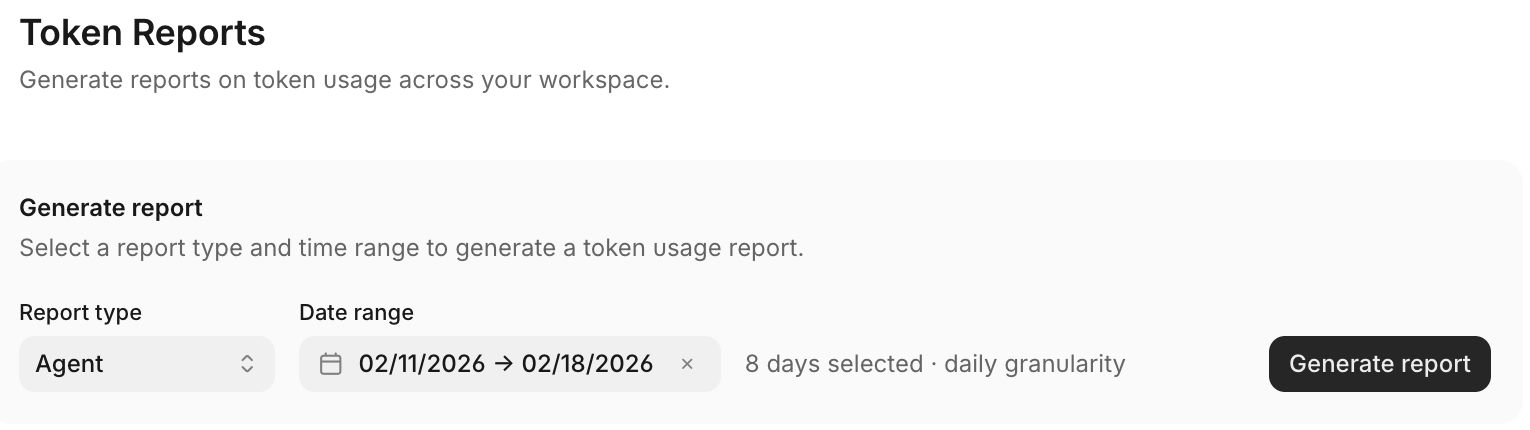
Token Reports let workspace admins generate and download detailed reports on AI token usage across their workspace.
What are Token Reports?
Token Reports provide visibility into how your workspace consumes AI tokens. Use them for:
- Billing reconciliation
- Usage analysis across workflows, hubs, or chats
- Cost allocation across projects or teams
Reports export as CSV files for further analysis in spreadsheets or BI tools.
How to generate a Token Report
-
Go to Settings > Billing and Usage
-
Select a date range for the report
-
Choose a report type (see below)
-
Click Generate Report
The report status updates in real-time:
- Pending - Report is queued
- Processing - Report is being generated
- Completed - Report is ready to download
Report types
Choose how to slice your token usage data:
| Report Type | Description |
|---|---|
| Workflow | Token usage grouped by workflow |
| Hub | Token usage grouped by hub project |
| Chat | Token usage grouped by chat case |
| Summary | Overall workspace summary |
Download and manage reports
Once a report shows Completed status:
- Click Download to get the CSV file
- Open in your preferred spreadsheet application
To remove old reports:
- Find the report in your list
- Click Delete
Note: Deleted reports cannot be recovered. Download any reports you need before deleting them.
Updated about 2 months ago
What’s Next
If you have any questions or feedback about this page, please reach out to us at [email protected]