
Skills
Skills are specialized AI capabilities designed to solve a specific task extremely well. Learn how to create, manage, and scale them across your team.
Watch this video for an overview of Skills - what they are, why we built them, and how they help teams scale their best ways of working.
What are Skills?
Your best operators have a way of working that often lives entirely inside their heads. Skills are a way to capture that invisible layer of success and scale it across your team.
A Skill is a specialized AI capability designed to solve one specific task extremely well.
Rather than relying on a single prompt to generate a single response, a Skill defines exactly how a task should be executed. They are written in plain language markdown, meaning they look much more like a cooking recipe than a block of code.
Once a Skill is created, the Go Agent reads these "recipes" to execute complex work on your behalf.
Invoking Skills with Go Agent
Because Go Agent is an orchestration engine, it handles the heavy lifting of figuring out how and when to use your Skills. There are two primary ways to invoke a Skill in Chat:
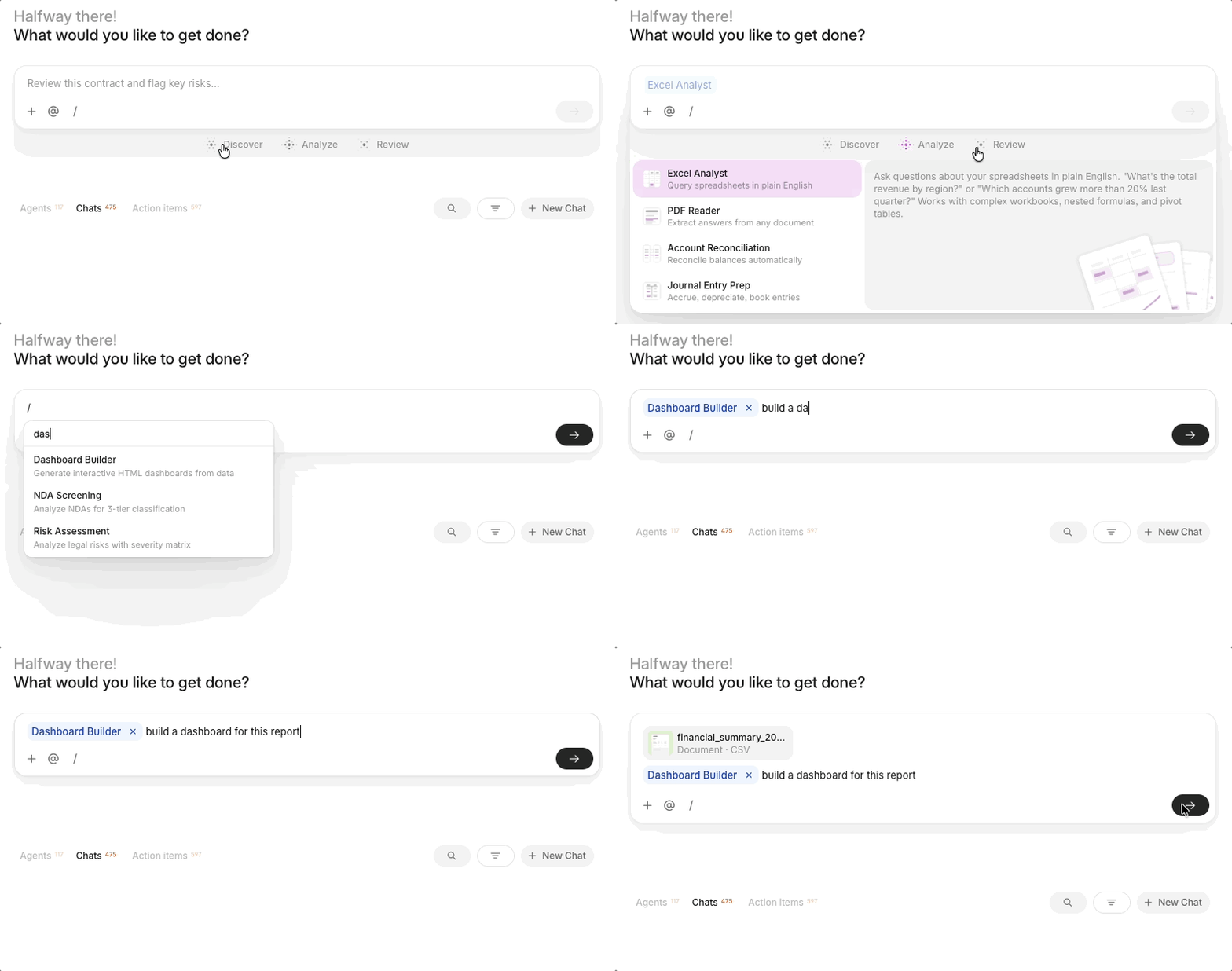
Natural language: You do not need to memorize commands. Simply open a Chat, upload your files or mention a Hub, and describe your goal in plain language. Go Agent reads your prompt, automatically identifies which Skill is best suited for the job, and runs it.
Slash commands: If you know exactly which Skill you want to use, you can trigger it manually. Type a forward slash (/) in the chat box to open a menu of available Skills. Select the one you need (such as /Excel Analyst or /Contract Review), add your instructions, and hit enter.
Multi-skill orchestration
You are not limited to running one Skill at a time. You can assign Go Agent a complex, multi-step goal. It will autonomously chain Skills together. For example, using one Skill to extract financial data from a PDF, and another to format that data into an investment memo, all within a single conversation.
Global Skills
Global skills are V7-approved skills that come built into the platform out-of-the-box. They are ready to use immediately to handle specialized, heavy-lifting tasks.
Here is how to explore Global skills in V7 Go:
- Click on the Skills tab in the left menu.
- View the list of pre-defined Global skills to see what capabilities are already available to you.
The V7 Go home screen shows 12 featured skills grouped under three tabs — Discover, Analyze, and Review. Hover any skill to read what it does, click to start and try it out.
Discover:
- News & Insights — track companies, people, and news
- Contact Finder — find and enrich leads
- Competitive Intel — map your competitive landscape
- Account Prep — sales-ready company briefings
Analyze:
- Excel Analyst — query spreadsheets in plain English
- PDF Reader — extract answers from any document
- Account Reconciliation — reconcile balances automatically
- Journal Entry Prep — accrue, depreciate, book entries
Review:
- Risk Assessment — score and prioritize risks
- Privacy Compliance — GDPR & CCPA guidance on demand
- NDA Screening — triage NDAs with risk classification
- Contract Review — catch risks, suggest redlines
Spreadsheet Generation Skill
Using the Spreadsheet Generator skill, V7 Go can generate fully formula-linked, multi-sheet spreadsheets. You can preview them as an interactive artifact and download the output as an Excel file. To use it, type / when writing your prompt and select Spreadsheet Generator from the list. From there, describe what you need and the agent handles the build.
This skill is purpose-built for structured financial and analytical work. Give an agent a brief and it will produce a complete workbook: cover sheet, assumptions, income statement, DCF model, sensitivity analysis, comparables, and more. This functionality can be even more powerful when combined with specialized AI agents.
Custom Skills
Custom skills are the unique "recipes" you create to reflect the actual, specific work your team needs to do. A Custom skill allows you to define exactly how an agent should repeatedly approach your workflows (like preparing an investment memo from scratch), and they can be combined alongside Global skills to orchestrate large end-to-end tasks.
Setting up and managing Custom skills
You don’t need to be highly technical to create a new Custom skill. You just need to know how to explain your work.
How to create a custom Skill:
- Navigate to the Skills page by selecting the Skills tab in the left menu.
- Click the “+” icon beside the search bar on the top, and select “From scratch”.
- Define your skill using markdown with YAML frontmatter. Include name, description, and allowed-tools in the frontmatter. See below for more details.
- Upload any supporting reference files that the skill might needs to run successfully.
- Click Create Skill to save changes and draft the new skill
- Publish the Custom skill as Live for your entire workspace to use, or keep it saved as a draft while you refine it.
You can also export and import existing skills using markdown (.md) files.
Markdown with YAML frontmatter
Every skill starts with a SKILL.md file containing YAML frontmatter and Markdown instructions. See agentskills.io (opens in new tab) for more information.
---
name: my-skill-name
description: Brief description of what this skill does and when to use it.
allowed-tools: Bash, Read, Grep, Glob
---

# Skill Name

## Overview

Describe the purpose and functionality of this skill.

## Workflow

1. First step
2. Second step
3. Third step

## Usage

Invoke this skill with:
```
/skill-name <arguments>
```
Updated about 1 month ago