
Model Selection Guide
Choose the best model for the task
Choosing the right model for your workflow directly impacts quality, speed, cost, and reliability. Different models perform better on different task types, such as tool calling, structured outputs, long-context reasoning, or content generation. Selecting the right default model ensures predictable performance in production while keeping token costs in check. The goal is not to use the most powerful model by default, but to use the most suitable one for the job.
Core Principles
-
Start with a cost-effective default and escalate only when needed
Begin with smaller models for standard tasks. If evaluation shows insufficient quality or reasoning depth, move to a more advanced model. Scale model capability based on actual need, not by default. -
Match the model to the task type
Different models vary in strengths across:- Tool calling and hub queries
- Long-context analysis
- Structured outputs (e.g. JSON, tables)
- Narrative generation (summaries, memos)
- Code or document generation
Select the model that aligns with the dominant requirement of the workflow’s workflow.
- Optimize for consistent performance, not theoretical perfection
Every model will occasionally fail in edge cases. Prioritize stable, high-quality performance across realistic test scenarios instead of trying to prevent every possible error. In production, consistent behavior matters more than rare moments of exceptional output.
Task to Model Mapping
This table provides guidance on mapping common workflow task types to the most suitable model, based on performance characteristics such as reasoning depth, structured output reliability, speed, and cost.
| Task Type | Recommended Model Family |
|---|---|
| Tool Calling / Hub Search | GPT-family |
| Narrative Writing (Memos) | Gemini-family |
| Long Context Document Analysis | Gemini Pro / GPT-5 |
| Structured JSON/Table Outputs | GPT-family |
| Code or HTML Generation | Anthropic-family |
| Classification / Tagging | Mini / Flash / Nano |
| Light Text Cleanup | Mini / Flash / Nano |
| Pre/Post-Processing | Mini / Flash / Nano |
Recommended Default Strategy
Use the following escalation approach when selecting models in V7 Go:
- Start with a smaller or lower-cost model
Begin with a smaller model for early development and straightforward tasks. These models are typically sufficient for prompt iteration, simple transformations, and initial workflow configuration.- Good for: initial scaffolding, prompt experimentation, and simple transforms.
- Example types: “Mini”, “Nano”, “Flash” tiers (provider-specific).
- Move to a mid- or high-tier model if quality is insufficient
If outputs are inconsistent or lack depth, upgrade to a more capable model. This is particularly important for:- Complex reasoning (e.g., multi-document analysis, nuanced investment judgment)
- Long documents (e.g., full IMs, DDQs)
- High-stakes outputs (IC memos, external write-ups)
- Use top-tier reasoning models selectively
Reserve the most advanced models for scenarios where lower tiers consistently fail.
Typical use cases include:
- Hard cases in your test set that cheaper models consistently fail
- Code/HTML generation where you need more robustness
- Very complex, multi-step analysis with lots of ambiguity
This tiered approach balances cost efficiency with production-grade reliability.
Model Comparison Matrix
| Model Tier | Best At | Weaknesses | Cost | Use When… |
|---|---|---|---|---|
| Mini / Flash / Nano | Light transforms, classification, tagging | Weak reasoning, no tool use | Lowest | You need speed, low cost, or helper steps |
| GPT 5.x | Tool calling, hub search, structured outputs | Slightly verbose, “AI-ish” tone | Mid-range | You need structure, reliability, and function calling |
| Gemini Pro | Summarization, narrative writing, long-context reads. Has the highest token context window limits. | Not ideal for tool calling, not great at Structured Output → JSON consistency. | Mid-range | You want clean, human-like language or long document analysis |
| Claude 4.x | Code, HTML templates, complex prompt logic | Expensive, slower | Highest | You’re building a template or running a complex scoring/calculation workflow |
Model Roles and When to Use Them
GPT-family models
Best at:
- Tool calling (skills, hub search, structured workflows)
- Hub-based retrieval and reasoning
- Structured outputs (JSON, tables, well-formed schemas)
- Good balance of cost, reliability, and flexibility
Use GPT models when:
- You’re building hub-heavy workflows (e.g., screening/IM workflows using Knowledge Hubs).
- You rely on skills/triggers and need robust function calling.
- You want predictable adherence to JSON schemas and structured outputs.
Gemini-family models
Best at:
- Narrative writing tasks (memos, summaries, narrative sections)
- Long context analysis (very large IMs, multi-document reads)
- Strong reasoning vs cost tradeoff, especially in recent “Pro” versions.
Use Gemini when:
- You’re generating written outputs that need to feel more natural, especially with additional prompt tuning.
- You’re summarizing or analyzing long documents or collections.
- Cost is a concern, but you still need good reasoning.
Claude / “Opus” level models
Best at:
- Code and HTML generation, including:
- Complex HTML report templates
- More intricate code scaffolding
- Handling more complex prompt logic when you need extra reasoning.
Caveats:
- Expensive relative to other options.
- Use sparingly - for example, to generate or refine a template once, not on every run in production.
Use “Opus-level” models when:
- You’re generating complex HTML/Python once, which you’ll then keep as a static template.
- You’ve proven cheaper models fail on specific, complex code-generation tasks.
Mini / Nano / Flash-style models
Best at:
- Simple, high-volume tasks:
- Classification (tags, flags, routing)
- Light transformations (cleaning text, simple extraction)
- Pre/post-processing around heavier steps
- Where “good enough” is sufficient and correctness is easy to verify.
Use Mini/Nano/Flash when:
- You’re iterating quickly on prompts and want cheap experimentation.
- You’re adding small “helper” properties (e.g., classify risk as Low/Med/High).
- Latency and cost matter more than deep reasoning.
Model Providers & Cross‑Provider Equivalents
Different providers use different naming schemes, but in practice most models fall into a few functional tiers:
- Light / Fast
- Mid‑Tier / Balanced
- Strong Reasoning
- Top‑Tier Reasoning
- Code / Template Specialists
This table shows approximate functional equivalents across the three major providers used in Go. These are not exact matches - just practical comparisons based on cost, speed, and reasoning strength.
| Use Case Tier | OpenAI | Anthropic | |
|---|---|---|---|
| Light / Fast | GPT‑5.2 Mini / Nano | Gemini Flash / Lite | Claude Haiku |
| Mid‑Tier Balanced | GPT‑5.2 | Gemini 2.5 Pro | Claude Sonnet |
| Strong Reasoning | GPT‑5.x Reasoning Tier | Gemini 2.5 Pro (high reasoning) | Claude Sonnet (high reasoning) |
| Top‑Tier Reasoning | GPT‑5.x Advanced | Gemini 3 Pro | Claude Opus |
| Code / Templates | GPT‑5.x (Code bias) | Gemini 3 Pro | Claude Opus |
| Long Context Analysis | GPT‑5.x | Gemini 3 Pro | Claude Sonnet / Opus |
| Narrative Writing | GPT‑5.x | Gemini 3 Pro | Claude Sonnet |
| Structured JSON / Tools | GPT‑5.x | Gemini 3 Pro | Claude Sonnet |
| High‑Volume Classification | GPT Mini / Nano | Gemini Flash | Claude Haiku |
Reasoning Levels: What They Are & When to Use Them
Adjusting the Reasoning Level in Go controls how much analytical depth the model applies to a prompt, balancing response quality and nuance against speed and token cost.
What Are Reasoning Levels?
In Go, most reasoning-capable models (e.g. GPT-5.x, Gemini Pro, Claude Sonnet/Opus) allow you to set a Reasoning Level, which adjusts how much computational depth the model uses when processing a given property or prompt.
This affects:
| Setting | What It Does |
|---|---|
| Auto | Allows Go to decide based on model and prompt complexity |
| Off | Fastest, lowest effort, works for trivial queries |
| Low | Slight increase in coherence, still cheap and fast |
| Mid | Balanced depth and cost, good for most tasks |
| High | Maximum reasoning depth, highest cost, used for nuanced analysis |
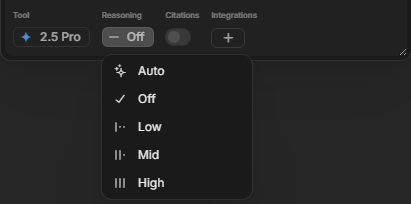
Using a higher reasoning level is especially useful when:
- The prompt requires multi-step reasoning
- The data is ambiguous or incomplete
- You need interpretation or judgment, not just extraction
How Reasoning Impacts Performance
| Reasoning Level | Speed | Cost | Depth of Thought | Best For |
|---|---|---|---|---|
| Min | Fastest | Cheapest | Shallow | Tagging, classification, routing |
| Low | Fast | Low | Basic logic | Entity name cleanup, labeling |
| Medium | Balanced | Moderate | Strong default | Summaries, light reasoning |
| High | Slower | More expensive | Deep / multi-step | Investment merit analysis, complex summaries |
Common use case Examples:
| Use Case | Suggested Reasoning Level | Why |
|---|---|---|
| Classify doc type as NDA / Lease / PO | Min | Obvious keywords, pattern match |
| Clean up company name from metadata | Low | Some fuzzy matching needed |
| Summarize “Business Model” from CIM | Medium | Requires extraction and summarization |
| Extract investment merits | High | Multi-point reasoning and judgment |
| Match PO to MSA via LLM reference | Medium or High | Requires understanding nuance between entities |
| Extract risk factors from IM | High | Needs interpretive skill and document understanding |
Practical Patterns in Go
1: Mixed-model pipelines
In many workflows, it’s optimal to combine models:
- Cheaper model:
- For early-stage extraction, tagging, or routing.
- Stronger model:
- For final narrative sections, investment merits, risks, or sensitive conclusions.
Example:
- Use a Mini model to:
- Extract key fields from an IM and classify sections.
- Use GPT/Gemini to:
- Write “Investment Merits”, “Risks”, and “Conclusion” blocks.
2: Use GPT for Tool-heavy workflows
Where your workflow:
- Calls hubs extensively
- Uses skills to integrate with DealCloud, Excel, CapIQ, or other tools
- Needs structured JSON outputs
Default to GPT-family for more reliable tool calling and schema adherence.
3: Use Gemini for Output-heavy memo workflows
Where your workflow:
- Produces long narrative outputs (e.g., screeners, IC memos)
- Needs clear, natural and well-writtenless text
Bias strongly toward Gemini Pro / equivalent, especially after light prompt tuning.
How to Decide What to Use for a New Workflow
When designing a new workflow:
- Define the output first
- Is it: classification, JSON, or narrative prose?
- Is this for internal, low-stakes, or high-stakes decision-making?
- Choose an initial model:
- Tool-heavy and structured - use GPT
- Long-form writing - use Gemini
- Code/HTML scaffolding - use Opus-level (for design phase only)
- Simple routing or classification - use Mini/Nano/Flash
- Test on 3–5 representative examples:
- Include edge cases to find weaknesses early on.
- Compare models side-by-side if needed by cloning a property and switching the model.
- Escalate only if necessary:
- If you see systematic errors or style issues that matter for the use case, step up to a stronger model.
- Keep an eye on token usage once you move beyond the prototype phase.
Key Takeaways
- Accuracy over Cost for critical workflows and extractions
- Keep cheaper models for ancillary tasks around those critical steps.
- Use Mini/Flash for volume, GPT for precision, Gemini for narrative, Opus for templates
- Clone and test properties with different models to compare performance quickly
- When in doubt:
- Start with a cheaper model.
- Benchmark against your golden test set (3–5 well-understood deals/memos).
- If output doesn’t meet your bar for investment decisions, move up a tier.
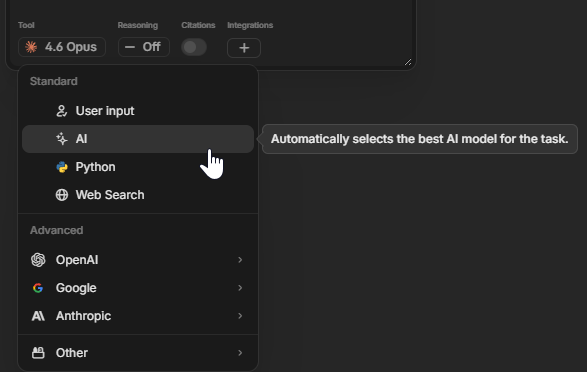
When in doubt or pressed on time, you can just use the AI option to let Go decide which model Tier and Family to use for the task at hand.
Updated about 1 month ago