---
updatedAt: 2026-09-02T17:22:04.000Z
agentTools:
projectIndex: https://docs.go.v7labs.com/llms.txt
---
# Create Entities Programmatically
This guide provides a comprehensive walkthrough on how to programmatically add entities to an existing Agent
Starting off, you'll either create a new Agent (project) or choose an existing one to work with. For the purpose of this guide, our focus will be on adding an entity to a straightforward Email Spam classifier Agent. This classifier is designed around two properties: '**Subject Line**' and '**Spam?**'. You can input subject lines either programmatically or manually. Once entered, the system evaluates each subject line to determine whether it is considered spam.
To use the [Entity Create API](https://docs.go.v7labs.com/reference/entity-create), we need two IDs: the **Workspace ID** and the **Agent ID**.
## Workspace ID
The Workspace ID can be found in the workspace setting page or by simply copying the first UUID in the address bar. Most of V7 Go's APIs requires a Workspace ID to operate.

## Workflow ID
The Workflow ID (Project ID) can be found by first navigating to the project, then clicking on the Workflow name, and finally picking `Copy agent ID` from the drop-down.
## Creating an entity
Ensure you have obtained your API key from the previous [page](https://docs.go.v7labs.com/reference/generate-an-api-key).
Run the Python code below to create a new empty entity in the Workflow, make sure to replace the variables with your IDs and keys.
```python python
import requests
# Set your workspace ID, project ID, and API key
# replace these values with your values
workspace_id = 'ec325cd3-e4c2-4f13-b71e-f6e8309bc377'
project_id = '018e9fa4-2589-7860-9138-e73cc662de27'
api_key = 'your key here'
url = f"https://go.v7labs.com/api/workspaces/{workspace_id}/projects/{project_id}/entities"
headers = { "X-API-KEY": api_key }
response = requests.post(url, json={}, headers=headers)
print(response.json())
```
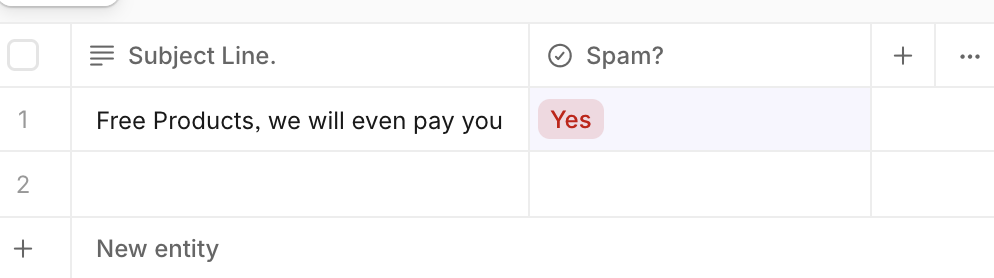
Instead of creating an empty entity let's try to prepopulate the 'Subject Line', first we need to find out the `property slug` for the 'Subject Line' property.
## Property Slug
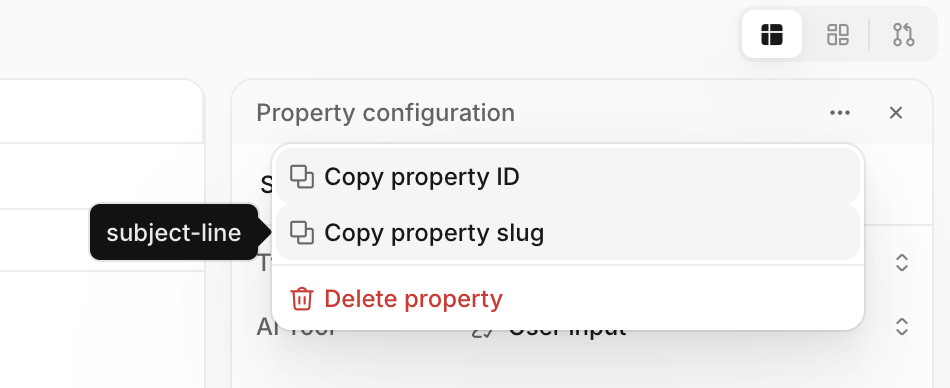
Click on the property and navigate to `More options` via the dropdown menu. Then, in the sidebar on the right, click on the three dots in the top right corner and select` Copy property slug`. Although the Property ID can also be used, it's generally best practice to use the slug for easier parsing and debugging.
## Create Entity with value
The main difference from the previous API call is that we are setting the field `subject-line` in the payload.
```python python
import requests
workspace_id = 'ec325cd3-e4c2-4f13-b71e-f6e8309bc377'
project_id = '018e9fa4-2589-7860-9138-e73cc662de27'
api_key = 'your key here'
url = f"https://go.v7labs.com/api/workspaces/{workspace_id}/projects/{project_id}/entities"
headers = { "X-API-KEY": api_key }
payload = { "fields": {"subject-line": "You have been invited to join Team ABC"}}
response = requests.post(url, json=payload, headers=headers)
print(response.json())
```
This will create a new entity, and return the entity ID together with the `subject-line` set.
```json json
{
"id": "018ea4ec-fef3-7efa-852c-9e68fccb3957",
"fields": {
"spam": {
"status": "idle",
"manual_value": {"value": None, "updated_by": None, "raw_text": None},
"tool_value": {"value": None, "updated_by": None, "raw_text": None},
...
},
"subject-line": {
"status": "complete",
"error_message": None,
"manual_value": {
"value": "You have been invited to join Team ABC",
"updated_by": "06f4351e-dc69-4d48-ba45-5e196676ed93",
},
"tool_value": {"value": None, "updated_by": None},
...
},
},
...
}
```
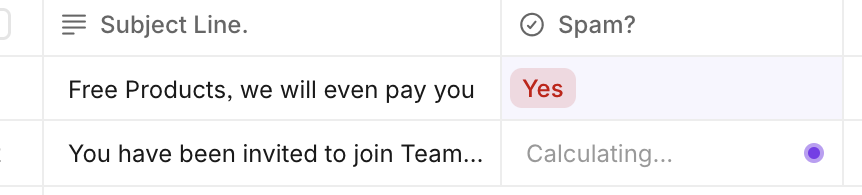
The Spam classifier will start running shortly after the entity has been created, and there are three main ways to get the final value programmatically:
* Poll for updates, [fetch the entity](https://docs.go.v7labs.com/reference/entity-get) until the "spam" field has been computed
* Set up a webhook, [create a webhook trigger](https://docs.go.v7labs.com/reference/trigger-create) that will call your endpoint whenever a specific property has been calculated
* Turn the entity create request into a synchronous call; waiting for one or more properties to complete. We will explain this approach in this guide
## Create Entity and wait
First find out the slug for the Spam property and then add a `wait_for` query parameter as shown below
```python python
import requests
workspace_id = 'ec325cd3-e4c2-4f13-b71e-f6e8309bc377'
project_id = '018e9fa4-2589-7860-9138-e73cc662de27'
api_key = 'your key here'
url = f"https://go.v7labs.com/api/workspaces/{workspace_id}/projects/{project_id}/entities?wait_for[]=spam"
headers = { "X-API-KEY": api_key }
payload = { "fields": {"subject-line": "You have been invited to join Team ABC"}}
response = requests.post(url, json=payload, headers=headers)
print(response.json())
```
This will now block execution until the spam field is complete or encountered an error or timed out.
## Upload Files
You can upload files to entities programmatically from local storage, public URLs, or Base64 Encoded files. Check out the recipes below to find out how!