---
updatedAt: 2026-11-05T17:50:02.000Z
agentTools:
projectIndex: https://docs.go.v7labs.com/llms.txt
---
# Token Reports
Generate and download detailed AI token usage reports for your workspace. Track usage by workflow, hub, chat, or get a summary view.
> 🚧 We're updating data reporting across Go.
>
> Click **[HERE](https://docs.go.v7labs.com/docs/usage-reports)** to learn more about out our new Reports dashboard.
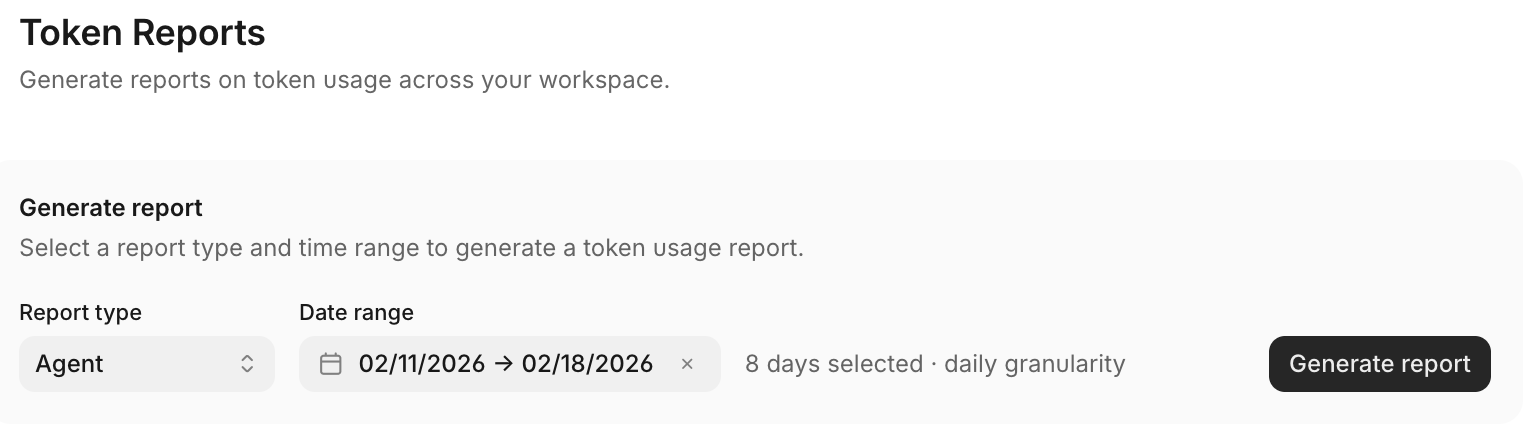
Token Reports let workspace admins generate and download detailed reports on AI token usage across their workspace.
## What are Token Reports?
Token Reports provide visibility into how your workspace consumes AI tokens. Use them for:
* Billing reconciliation
* Usage analysis across workflows, hubs, or chats
* Cost allocation across projects or teams
Reports export as CSV files for further analysis in spreadsheets or BI tools.
## How to generate a Token Report
1. Go to **Settings** > **Billing and Usage**
2. Select a **date range** for the report
3. Choose a **report type** (see below)
4. Click **Generate Report**
The report status updates in real-time:
* **Pending** - Report is queued
* **Processing** - Report is being generated
* **Completed** - Report is ready to download
## Report types
Choose how to slice your token usage data:
| Report Type | Description |
| ------------ | ---------------------------------- |
| **Workflow** | Token usage grouped by workflow |
| **Hub** | Token usage grouped by hub project |
| **Chat** | Token usage grouped by chat case |
| **Summary** | Overall workspace summary |
## Download and manage reports
Once a report shows **Completed** status:
1. Click **Download** to get the CSV file
2. Open in your preferred spreadsheet application
To remove old reports:
1. Find the report in your list
2. Click **Delete**
> **Note:** Deleted reports cannot be recovered. Download any reports you need before deleting them.